EVE IaC for EVE V7 - Complete User Manual
This manual covers the operator-facing features of EVE IaC 0.5.3 for Visual Studio Code and Cursor with EVE V7. It follows the business lifecycle of a lab: connect, acquire, design, validate, deploy, operate, synchronize, and retire.
EVE IaC is an independent open-source project, not an official EVE-NG, Visual Studio Code, or Cursor product.
References: documentation, GitLab repository, releases.
Screenshots were captured from a live EVE V7 workspace.
1. Operating Model
| Responsibility | Scope | Source of truth |
|---|---|---|
| Infrastructure as Code | Nodes, networks, links, positions, startup configs, presentation | Git under IaC/<lab>/ |
| Interaction as Code | Consoles, runtime state, live link quality, suspension, traffic | Running EVE V7 lab |
The extension communicates with eve-iac-agent over HTTPS, normally on TCP port 8787. The agent runs on EVE V7 and uses the local EVE API.
Recommended workflow:
- Install the agent and extension.
- Establish a trusted connection.
- Create, import, or load a lab.
- Edit the desired state in Git.
- Validate and review the plan.
- Deploy or reconcile the managed lab.
- Operate nodes and consoles.
- Pull approved EVE changes back to Git.
- Commit the resulting files.
- Retire the managed lab when no longer required.
2. Installation
2.1 Requirements
| Component | Requirement |
|---|---|
| EVE server | EVE V7, eve-iac-agent, HTTPS port 8787, required images/templates |
| Workstation | VS Code or Cursor 1.85+, network access, EVE IaC VSIX |
| Recommended extension | Red Hat YAML |
| Project | A Git folder where IaC/<lab>/ can be created |
The VSIX works on Windows, macOS, and Linux. The workstation does not need Go.
2.2 Install the agent
sudo dpkg -i eve-iac-agent_0.5.3-1_amd64.deb
sudo systemctl status eve-iac-agent
curl -k -sS https://127.0.0.1:8787/api/v1/health
The service must report active (running). Record the TLS fingerprint:
sudo openssl x509 -noout -fingerprint -sha256 \
  -in /opt/unetlab/addons/eve-iac-agent/tls.crt
If absent, check /opt/unetlab/go/server.crt.
2.3 Install the extension
- Download
eve-iac-client-0.5.3.vsixfrom the GitLab Release. - Open Extensions > More Actions > Install from VSIX....
- Select the VSIX and reload if requested.
- Open the Git project folder.
- Select EVE IaC in the Activity Bar.
Use one owner window per session. A second IDE window can receive session_already_active.
3. Secure Connection
Open EVE IaC > Connection > Configure Connection and enter the agent URL, EVE username, and EVE password. Use https://<EVE-host>:8787; plain HTTP is rejected.
On first contact, compare the displayed SHA-256 fingerprint, certificate subject, and Subject Alternative Names with the server certificate. A later certificate change produces tls_pin_mismatch and requires a new trust decision.
Passwords may be stored in IDE Secret Storage. They are never written to settings.json, Git, or MCP configuration. The extension uses an opaque agent session token instead of exposing EVE cookies.
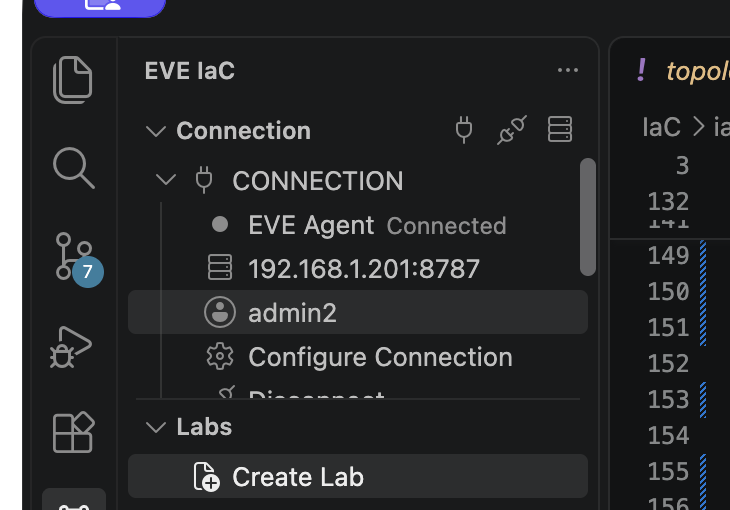
Connection status, endpoint, authenticated identity, configuration, and disconnect controls.
| Control | Purpose |
|---|---|
| Configure Connection | Change URL, account, password, or certificate trust |
| Sign In | Authenticate to the configured agent |
| Disconnect | Close the current IDE session |
| Clear Saved Credentials | Remove stored credentials and secret material |
Settings include eveIac.agentUrl, eveIac.username, and eveIac.labPath. The password is intentionally not a normal setting.
4. Acquire a Lab
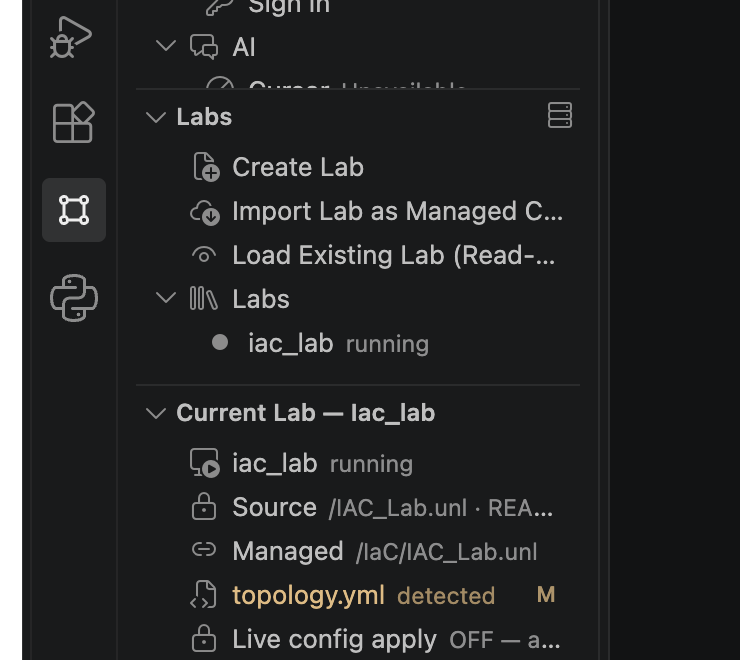
Choose the mode according to topology ownership.
| Business need | Command | Mode | Ownership |
|---|---|---|---|
| Build from Git | Create Lab | create |
EVE IaC owns the managed lab |
| Adopt an existing lab safely | Import Lab as Managed Copy | import |
Source is immutable; EVE IaC owns a copy |
| Operate without managing design | Load Existing Lab (Read-Only Topology) | load |
EVE owns the topology |
Selecting a lab changes context only. It does not start, stop, deploy, or delete anything.
4.1 Create Lab
Creates:
IaC/<lab-name>/
  .eve-iac.yml
  topology.yml
  configs/
The marker records mode: create. An existing topology.yml is not overwritten.
4.2 Import Lab as Managed Copy
Import reads an existing EVE lab, writes its Git representation, records the source as immutable, and creates or targets a separate managed lab under /IaC/. It can also import supported presentation data.
The Source path is never mutated. Deploy and Reconcile affect only Managed. Import is initial adoption; Pull from EVE is later synchronization.
4.3 Load Existing Lab
LOAD creates only the local marker required to attach to an existing lab. It allows Inspect, Open Lab, start/stop/wipe, consoles, and live link actions. Validate, Plan, Deploy, Reconcile, Pull, and managed deletion are unavailable because EVE IaC does not own the topology.
4.4 Migrate an older project
Migrate Root Project into IaC/ converts a root-level .eve-iac.yml project to IaC/<lab>/. Review the Git diff immediately afterward.
5. Cockpit: Detailed Reference
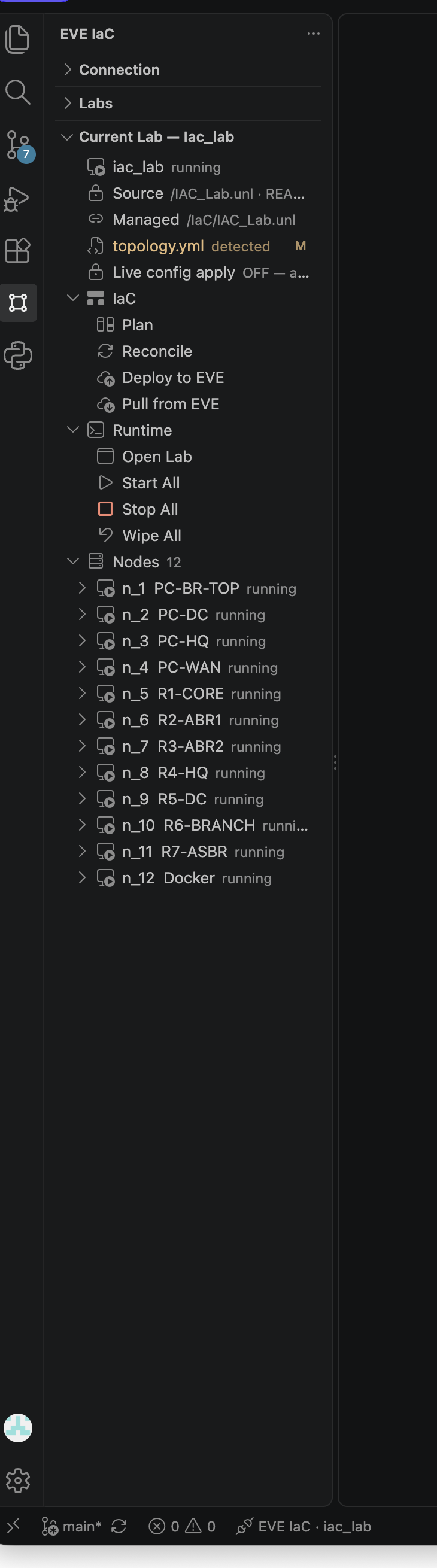
The sidebar is the operational Cockpit. It contains Connection, Labs, and Current Lab. The status bar repeats connection and active-lab context.
5.1 Connection
This section shows agent state, endpoint, authenticated EVE identity, connection controls, and AI integration status. Header icons provide configuration, disconnect, and the complete action menu.
5.2 Labs
The first rows start Create, Import, and Load workflows. The nested Labs group lists local projects discovered under IaC/, with each lab's observed runtime state. Selecting a row only changes active context.
5.3 Current Lab identity
| Row | Meaning |
|---|---|
| Active lab | Current context and observed runtime state |
| Source | Immutable source for imported or loaded projects |
| Managed | Only EVE path topology commands may mutate |
topology.yml |
Desired-state file; M indicates a modified file |
| Live config apply | Per-lab authorization for unprompted live changes |
For imported labs, verify that Source and Managed are different before Deploy or Reconcile.
5.4 IaC group
| Action | Behavior |
|---|---|
| Plan | Computes Git-to-EVE differences without changing EVE |
| Reconcile | Corrects supported drift in the managed lab |
| Deploy to EVE | Creates or updates the managed topology from Git |
| Pull from EVE | Imports approved EVE-side changes into project files |
Plan is the routine approval checkpoint and should be reviewed like an infrastructure change.
5.5 Runtime group
| Action | Scope | Effect |
|---|---|---|
| Open Lab | Lab | Opens the EVE V7 HTML5 topology in the IDE |
| Start All | Lab | Starts every node |
| Stop All | Lab | Stops every node and interrupts sessions |
| Wipe All | Lab | Clears runtime state for every node |
Stop All and Wipe All are broad actions. Confirm the Current Lab heading first.
5.6 Nodes group
Each row shows node key, display name, and runtime state. Expand a node for targeted actions.
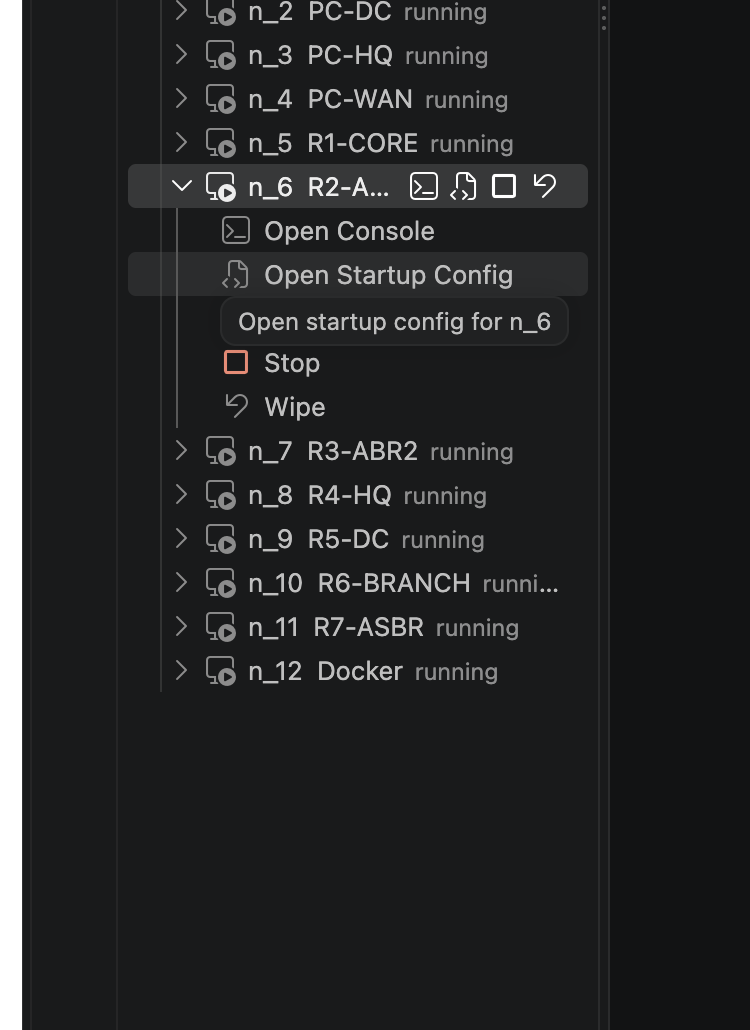
| Node action | Purpose |
|---|---|
| Open Console | Opens the template's text or graphical console |
| Open Startup Config | Opens the selected config-set file |
| Startup Config status | Shows config set, expected path, and file presence |
| Start | Starts this node |
| Stop | Stops this node |
| Wipe | Clears this node's runtime state |
Selected node rows also show inline action icons. Hover an icon for its tooltip.
5.7 Header actions and full menu
The Current Lab header offers Open Lab, Inspect / Refresh, and the full EVE IaC menu.
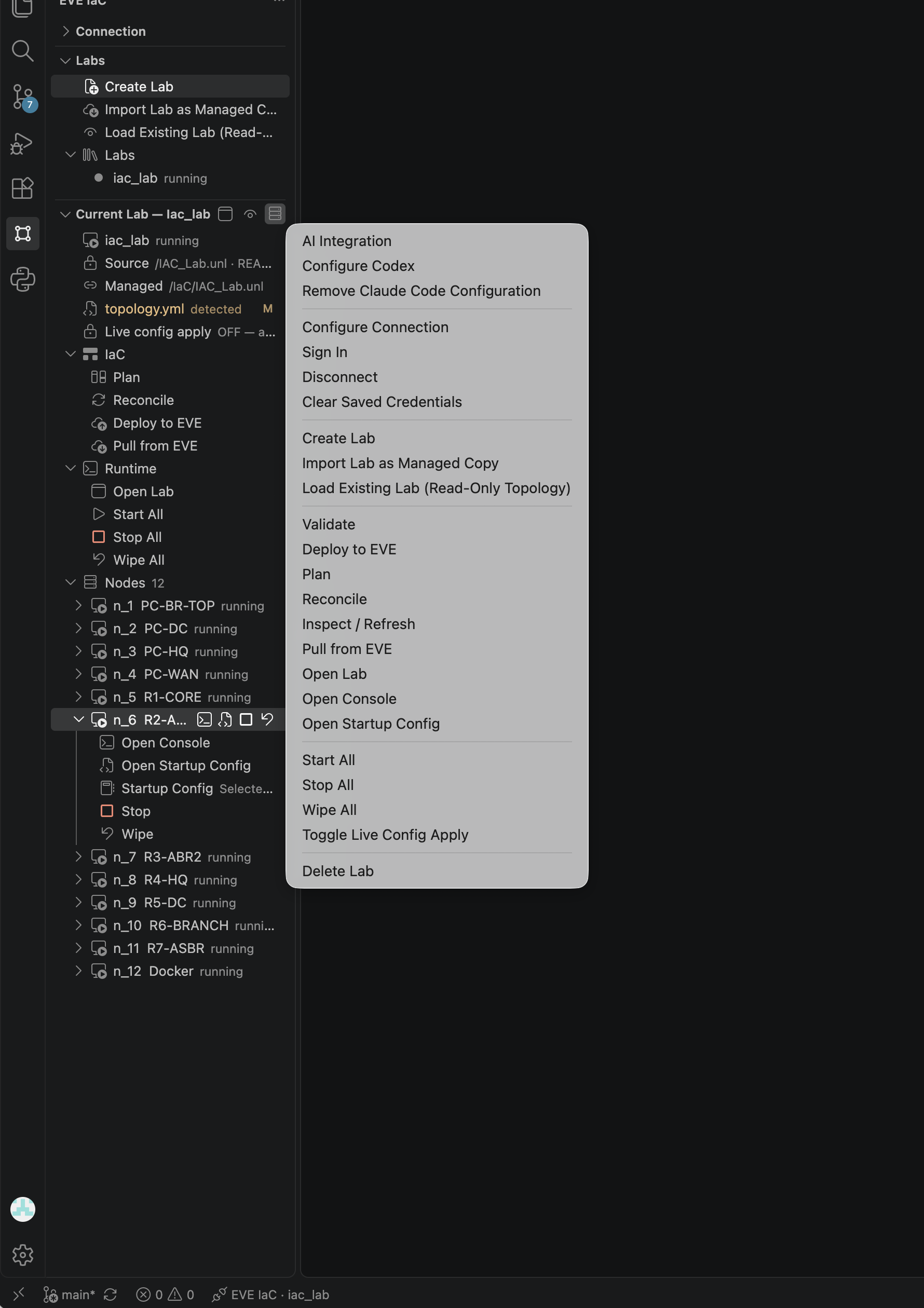
Use the menu when a tree group is collapsed or an action is outside the current scroll position.
6. Project Files and Editing
IaC/<lab>/
  .eve-iac.yml
  topology.yml
  eve-presentation.yml        # optional
  configs/
    default/
      n_1.cfg
    <alternate-configset>/
      n_1.cfg
.eve-iac.yml records mode and EVE paths. topology.yml is desired state. eve-presentation.yml carries supported visual metadata. configs/<configset>/ stores startup configurations.
6.1 Schema-aware YAML
The extension registers the EVE IaC schema. With Red Hat YAML installed, the editor provides validation, hover help, completion, and field documentation.
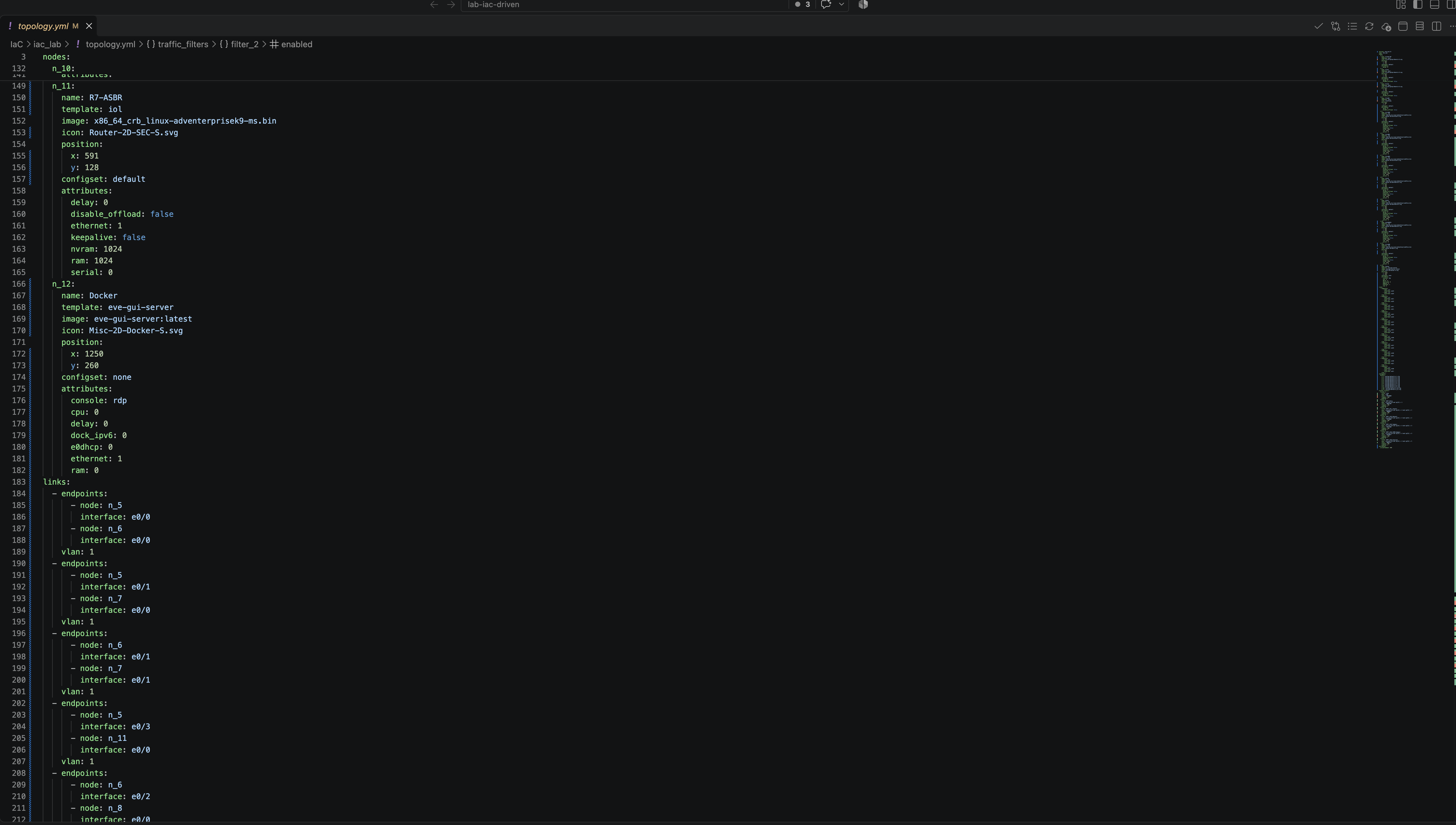
The editor toolbar exposes Validate, Open Changes, Plan, Reconcile, Pull from EVE, and Open Lab.
Use Fill Template Defaults and Fill Network Defaults to insert supported defaults, then review generated values before committing.
6.2 Nodes, networks, and links
A node normally defines a stable key such as n_1, display name, template, image, position, config set, and template attributes. Links reference stable keys, not display names. Renaming a deployed key can be interpreted as deleting one node and creating another.
Networks define shared segments. Links define endpoint pairs and optional VLAN attributes. Validate interface names against the EVE template.
6.3 Configuration sets
configset selects configs/<configset>/<node>.cfg. Use none when no startup configuration should be applied. Alternate sets support exercises and staged scenarios without duplicating topology.
7. Validate, Plan, Deploy, Reconcile
Validate
Validation checks schema and domain rules, including references, endpoint definitions, supported values, and configuration paths. Run it after changing keys, templates, images, interfaces, networks, links, or config sets.
Plan
Plan is read-only. Review creations, removals, node replacement, link changes, startup config changes, and Source/Managed paths. An unexpected removal is a reason to stop.
Deploy to EVE
Recommended sequence:
- Save all files.
- Validate.
- Plan.
- Review destructive operations.
- Deploy.
- Inspect / Refresh.
- Open Lab and confirm the result.
Reconcile
Reconcile repairs supported drift when Git must remain authoritative. To preserve an intentional EVE-side change, use Pull from EVE instead.
Live Config Apply
Toggle Live Config Apply controls a per-lab safety gate. When OFF, MCP-driven live reconcile or wipe must ask first. Keep it OFF for shared or production-like labs. Enable it only for a controlled automation window.
8. Operate in EVE V7
Open Lab opens the EVE V7 HTML5 interface inside the IDE, preserving the Cockpit beside the topology.
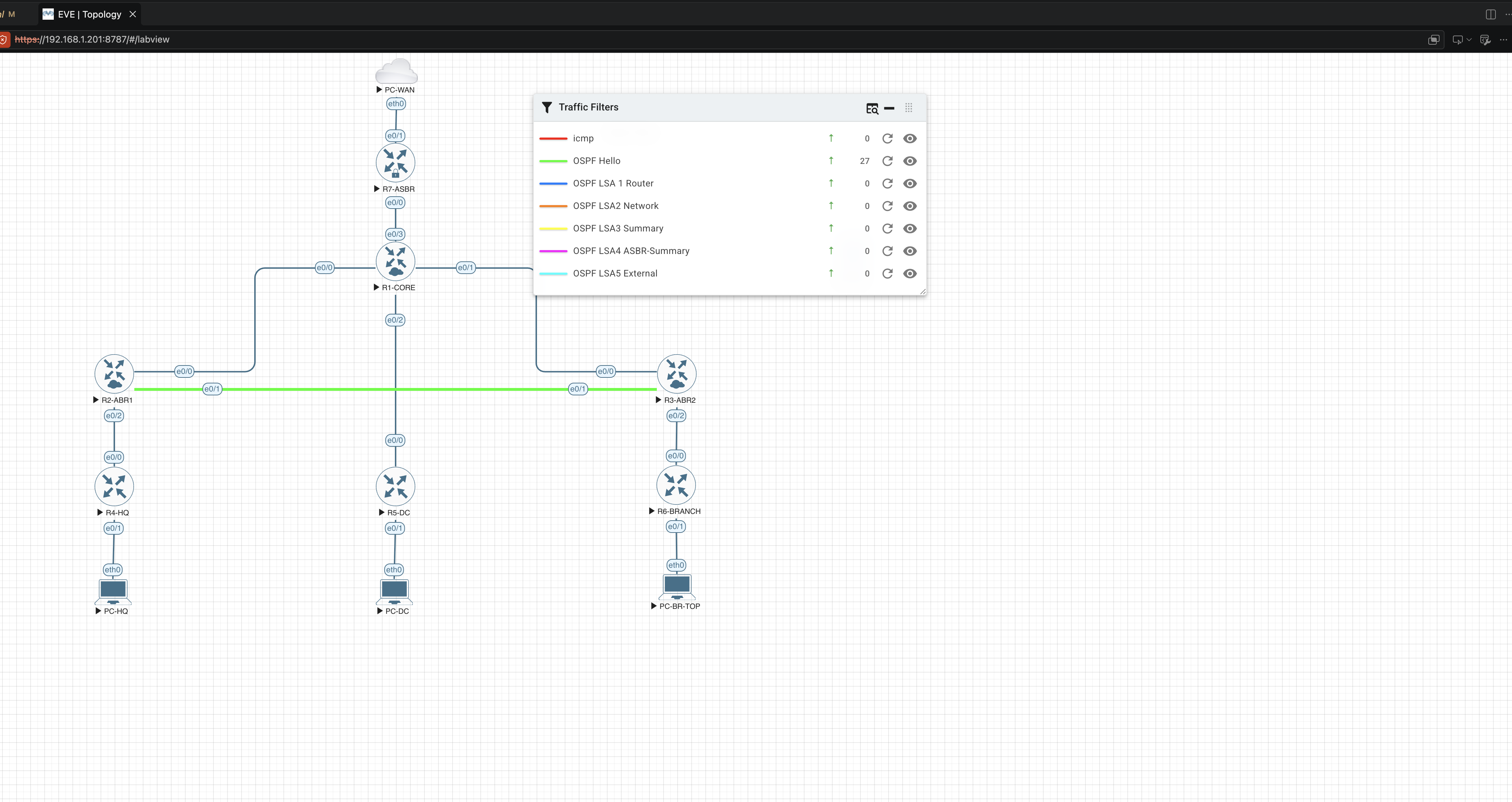
The embedded EVE view remains interactive. The example shows live OSPF traffic filters and counters.
Use Inspect / Refresh after out-of-band changes, runtime actions, reconnection, or deployment. It refreshes observed state without changing the lab.
Start boots from configured startup state. Stop terminates the process while preserving its state. Wipe clears runtime state so the next start follows startup configuration again. Wipe does not delete the topology.
9. Consoles and Clipboard
For serial/Telnet-style nodes, Open Console creates a tab in the EVE Console panel. Multiple sessions can remain open as tabs.
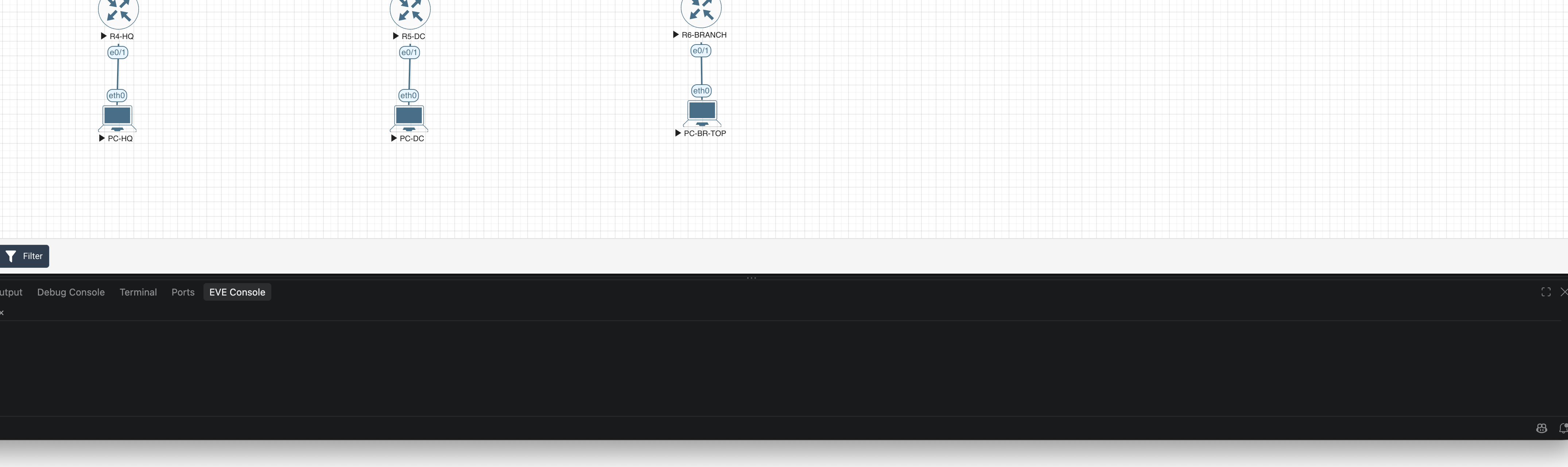
The connection indicator confirms transport status. Closing a console tab does not stop the node.
RDP, VNC, and other graphical console types use the supported embedded or external workflow for the template and workstation.
Paste Local Clipboard sends local clipboard text to the active supported console. Verify the target node and prompt before pasting. Do not expose secrets unintentionally.
10. Pull Changes from EVE
Use Pull from EVE when a managed EVE change is intentional and should become Git state:
- Inspect / Refresh.
- Pull from EVE.
- Review the Git diff.
- Validate the imported representation.
- Remove transient or accidental changes.
- Commit approved files.
Pull never mutates the immutable import source. It is unavailable in LOAD mode.
11. Live Links and Traffic
Live-link functions apply runtime behavior without rewriting topology intent. Supported operations can include inspection, delay/jitter/loss/rate quality, suspend/resume, and traffic counters or filters.
Use these for demonstrations, incident exercises, and fault injection. Document a scenario separately when it must be reproducible.
12. AI and MCP Integration
| Command | Purpose |
|---|---|
| AI Integration | Opens integration workflow and status |
| Configure Claude Code | Writes supported Claude Code MCP configuration |
| Configure Codex | Writes supported Codex MCP configuration |
| Remove Claude Code Configuration | Removes configuration created by EVE IaC |
| Remove Codex Configuration | Removes configuration created by EVE IaC |
Cursor may use dynamic in-session MCP registration rather than a static file. The same safety model applies to AI actions. Never put the EVE password in prompts or MCP files.
13. Delete and Retire
Delete Lab removes the EVE IaC managed lab according to ownership rules. It must not delete an immutable import source.
Before deletion, confirm the active lab, Source and Managed paths, pull and commit required changes, and stop dependent consoles or automation. Wipe All clears runtime state; Delete Lab removes the managed topology.
14. Complete Command Reference
| Command | Effect | Availability |
|---|---|---|
| Show Actions / Show Sidebar | Navigation only | Always |
| Configure Connection / Sign In / Disconnect | Session management | As applicable |
| Clear Saved Credentials | Removes stored secrets | Always |
| Create Lab | Creates managed project | Connected |
| Import Lab as Managed Copy | Adopts to an isolated copy | Connected |
| Load Existing Lab | Read-only topology attachment | Connected |
| Select Active Lab | Changes context only | Local labs present |
| Open Topology | Opens desired-state file | CREATE/IMPORT |
| Validate / Plan | Read-only analysis | CREATE/IMPORT |
| Deploy / Reconcile | Mutates managed topology | CREATE/IMPORT |
| Pull from EVE | Changes local files | CREATE/IMPORT |
| Inspect / Refresh | Refreshes observed state | Active lab |
| Open Lab | Opens embedded EVE UI | Active lab |
| Start/Stop/Wipe All | Lab runtime action | Active lab |
| Start/Stop/Wipe Node | Node runtime action | Inspected node |
| Open Console | Opens console session | Inspected node |
| Open Startup Config | Opens config file | File available |
| Paste Local Clipboard | Sends console input | Active console |
| Toggle Live Config Apply | Changes authorization state | Active lab |
| Migrate Root Project into IaC/ | Changes local layout | Legacy project |
| Fill Template/Network Defaults | Edits local topology | Editor context |
| Configure/Remove Claude Code or Codex | Changes local AI config | Supported client |
| Delete Lab | Deletes managed lab | Owned managed lab |
15. Troubleshooting
Agent disconnected
Confirm the service, test the health URL, check routing/firewall, then Sign In. Reconfigure if the endpoint or account changed.
TLS fingerprint mismatch
Do not bypass it. Verify whether the server certificate was intentionally renewed and compare its SHA-256 fingerprint before trusting the replacement.
session_already_active
Disconnect or close the previous owner window, then sign in from the intended workspace.
No active lab
Select a lab under Labs. If none appears, verify IaC/<lab>/.eve-iac.yml exists in the open folder.
IaC actions disabled
LOAD mode intentionally disables topology operations. Otherwise verify topology.yml exists and the agent is connected.
Unexpected deletion in Plan
Stop. Check active lab, Source/Managed paths, stable node keys, template/image values, and the Git diff.
Startup config not applied
Verify configset, file path, and Present: yes. Some changes require a node wipe before the next boot reads startup configuration.
Console does not open
Refresh, confirm the node is running, verify its console type, and check browser/webview or external handler permissions.
Embedded page paused
Dismiss the IDE notification covering the embedded browser; it can pause while a notification has focus.
16. Operator Checklists
Before deployment
- Correct active lab and EVE V7 server
- Source and Managed paths verified
- Files saved; Validate successful
- Plan and destructive changes reviewed
- Required images/templates present
- Git working state understood
Before runtime maintenance
- Correct node or lab scope
- Console users informed
- Startup config retained in Git
- Stop/Wipe impact understood
- Live Config Apply authorization appropriate
After an EVE-side design change
- Inspect / Refresh completed
- Pull completed and Git diff reviewed
- Imported files validated
- Approved state committed
Before retirement
- Required changes pulled and committed
- Managed path confirmed
- Immutable source confirmed untouched
- Consoles and automation stopped
- Delete confirmation reviewed